Digital marketing moves fast, and that pace makes security easy to overlook. Yet every campaign relies on stable sites, intact analytics, and protected client data. A strong approach to cyber security in digital marketing helps agencies work confidently as they launch new campaigns, add integrations, and manage high-traffic moments. When security becomes part of your everyday workflow, you safeguard client trust and keep your marketing performance on track.
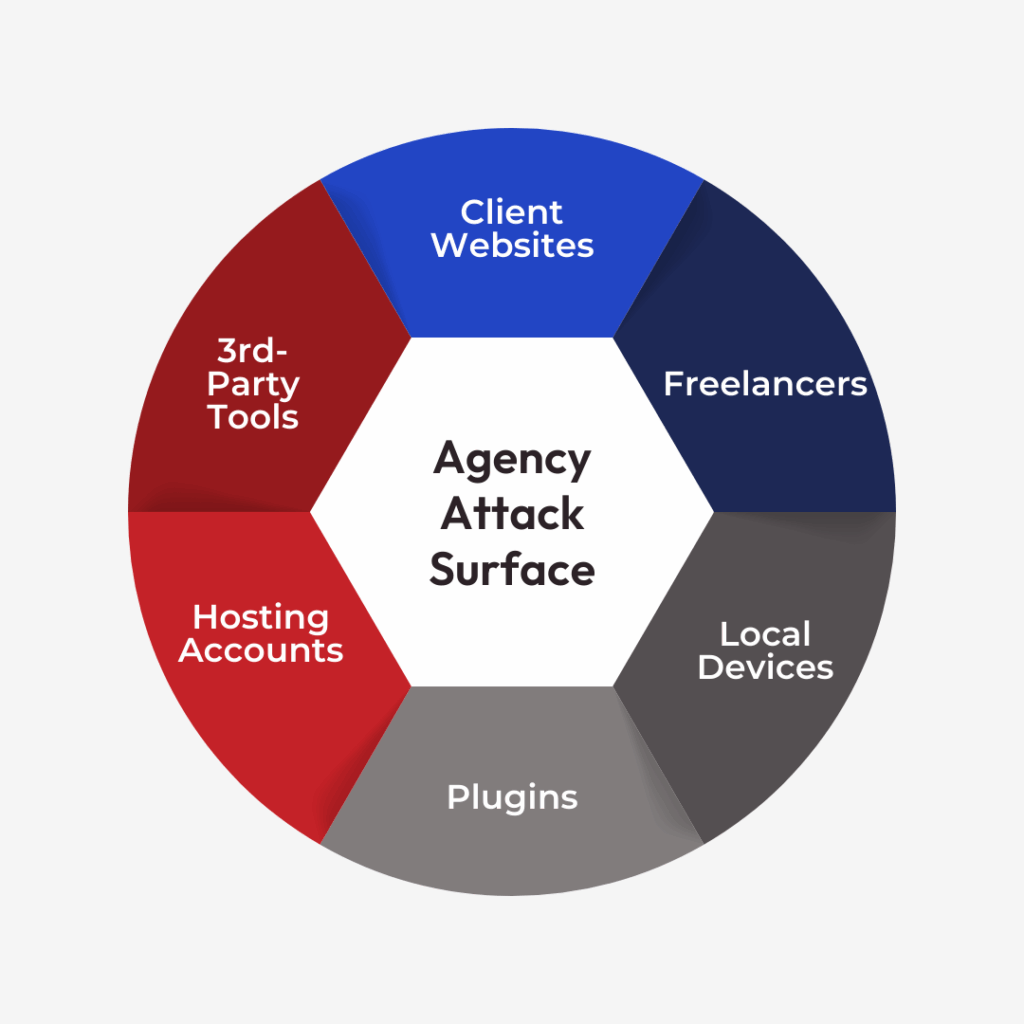
When you manage multiple client sites as a marketing agency, you carry more security risk than a typical site owner. Campaign microsites, landing pages, lead-gen forms, and tracking scripts all expand your attack surface.
Security isn’t just a technical checkbox: it’s tied directly to your reliability, client relationships, and reputation. When clients invest in campaigns, advertising spend, and long-term brand equity, they expect their sites to stay secure. According to IBM’s 2024 Cost of a Data Breach Report, the average data breach now costs $4.88 million: a stark reminder that security failures carry real financial consequences. When clients invest in campaigns, advertising spend, and long-term brand equity, they expect their sites and marketing data to stay secure.
This guide covers the core security principles every agency should understand and implement, supported by proven practices for WordPress, Joomla, and custom-coded sites.
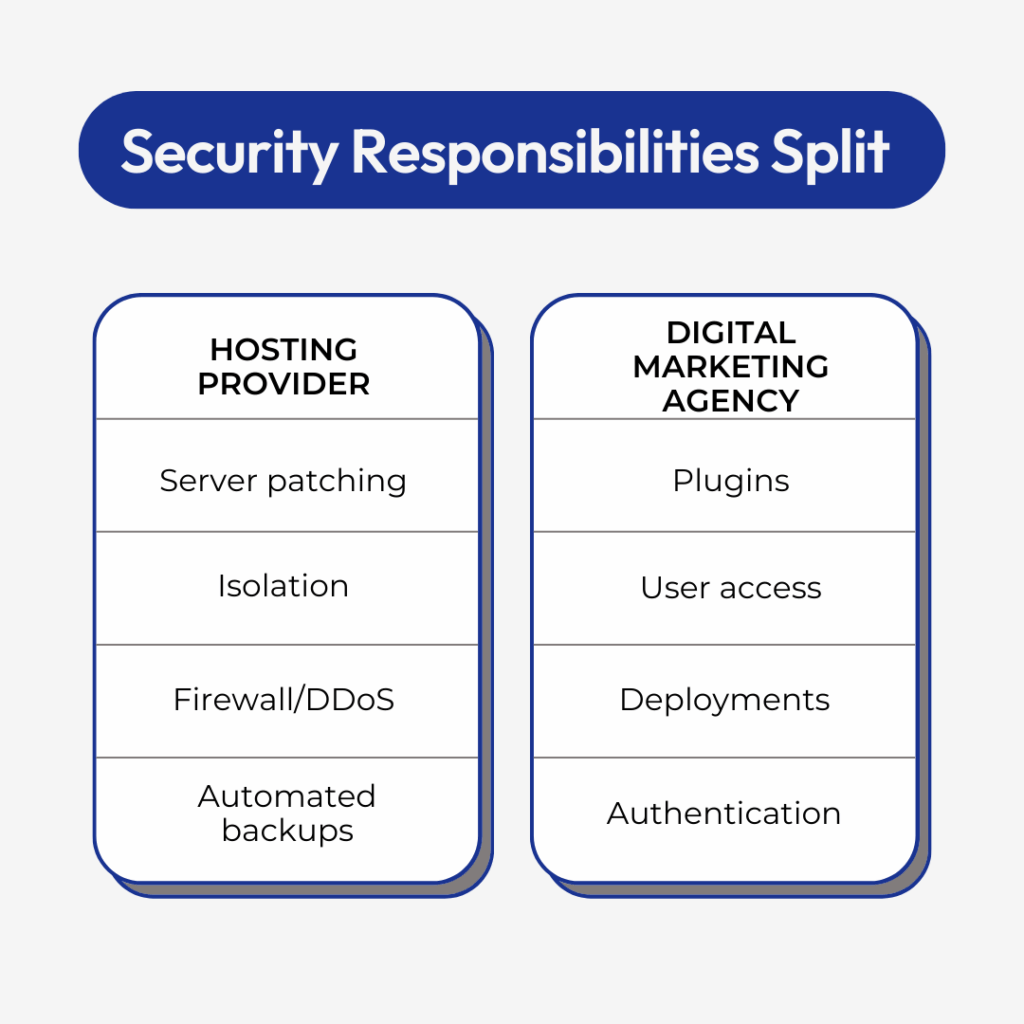
Security Is a Shared Responsibility
Your hosting platform provides the foundation: isolated accounts, modern PHP versions, hardened server settings, and automated patching. But you’re responsible for the application layer: where plugins, themes, credentials, and deployments happen daily.
Keep Software Updated
Every outdated plugin introduces risk. Attackers scan for publicly available code vulnerabilities in open-source CMSs. Most compromises occur because software isn’t updated consistently. The window between a vulnerability disclosure and active exploitation can be just hours. Research from Patchstack shows that 7,966 new WordPress vulnerabilities were discovered in 2024 alone. That’s a 34% increase from the previous year.
WordPress hosting, Joomla, and similar platforms release frequent updates that often include urgent security patches. When you manage dozens of sites, a missed update can remain unnoticed for months while attackers actively exploit that exact vulnerability. This creates a silent security debt that compounds across your entire client portfolio. The WPScan vulnerability database tracks over 64,000 vulnerabilities in the WordPress ecosystem, with 97% originating from plugins rather than WordPress core.
Your update strategy should include:
Automatic core updates when possible
Weekly plugin and theme update checks
Immediate patching for critical security releases
Testing updates in staging before production deployment
Enforce Strong Authentication
Multi-factor authentication (MFA) is one of the simplest and most effective methods to prevent unauthorized access. Combined with password managers and complexity requirements, MFA dramatically reduces your risk profile. Even if a password is compromised through phishing or data breaches, MFA provides a critical second barrier. Credential-based attacks are now the most common initial attack vector, accounting for 16% of all breaches and taking an average of 292 days to identify and contain. cPanel’s security features include built-in two-factor authentication options.
Avoid shared logins for temporary contractors. A single shared credential often becomes the root cause of major security incidents. When multiple people use the same login, you lose accountability and create opportunities for credential leakage.
Control Access Throughout the Lifecycle
Access sprawl is one of the biggest security gaps agencies face. Former employees, freelancers, and temporary partners often retain credentials long after projects end. While they may not act maliciously, their local machines, saved passwords, or compromised email accounts can become attack vectors.
Implement a structured access lifecycle:
Grant least-privilege access for each role
Revoke all credentials when projects close
Document every login, permission, and integration
Audit user lists monthly
Monitor Deployments and File Changes
You can’t protect what you can’t observe. Track theme edits, plugin installations, core updates, and new integrations. Attackers often hide within legitimate files or quietly add backdoors. Monitoring provides the visibility you need to detect problems before they escalate. Organizations take an average of 258 days to identify a breach. This is a time where attackers can steal data, install backdoors, and spread across your infrastructure.
Without monitoring, you may only discover an issue after Google flags malware or clients report redirect injections. By that point, the damage to client trust and search rankings may already be significant. Real-time file integrity monitoring gives you the earliest possible warning.
How Performance and Cyber Security Support Marketing Agencies
Security and performance aren’t separate priorities, they’re deeply connected. A secure environment is almost always a faster, more stable environment.
Isolation Prevents Cross-Contamination
Modern infrastructure separates accounts to prevent one compromised site from infecting others. Agencies benefit significantly from containerized environments where each client’s data stays contained. Without isolation, a single vulnerable plugin on one client site could provide attackers access to your entire portfolio. Proper account segmentation turns what could be a portfolio-wide crisis into a manageable single-site incident. VPS hosting and dedicated servers provide the isolation agencies need to protect multiple clients simultaneously.
Modern Software Improves Both Speed and Security
Running legacy PHP slows everything: speed, security, and compatibility. Attackers target outdated versions because of known vulnerabilities. Your server software must remain current, just like your plugins. Modern PHP versions include performance optimizations that can improve site speed by 30% or more while simultaneously closing security holes. This dual benefit makes PHP updates one of the highest-value maintenance tasks you can perform.
Proper Resource Handling Protects High-Traffic Sites
Campaign traffic spikes from paid ads, email campaigns, or product launches can expose weak systems. Misconfigured caching layers, file permissions, or resource allocations cause performance drops and attackers frequently target stressed sites. A site struggling under legitimate traffic becomes more vulnerable to resource exhaustion attacks. DDoS protection helps defend against resource exhaustion attacks.
When your hosting uses NVMe storage, optimized PHP handlers, and scalable processing power, you reduce the opportunities attackers have to exploit slowdowns. Managed WordPress hosting with proper resource handling means your sites remain responsive during traffic surges, which protects both user experience and security posture.
Speed Reduces Attack Windows
Slow sites increase exposure to brute-force attacks, resource exhaustion, and bot probing. Fast websites built for performance marketing, SEO, or conversion should see security and performance as the same operational commitment. Response time matters for security just as much as it matters for conversion rates. When your infrastructure responds quickly to legitimate requests, it can also respond quickly to threats. This identifies and blocks malicious traffic before it causes damage.
Human Support Matters During Security Events
When you handle dozens of client sites, support quality becomes a critical security factor. An issue affecting a single campaign microsite on a Saturday night can quickly turn into lost leads, wasted ad spend, and broken reporting across multiple accounts.
Know Who You Can Reach in an Emergency
Many hosting providers rely on automated replies or outsourced support. During a malware event or account compromise, you need real guidance from an expert who can verify logs, review file structures, and help trace the root cause. Generic troubleshooting steps waste critical time during active security incidents. Direct access to knowledgeable technicians who understand your specific environment can mean the difference between a two-hour incident and a two-day crisis.
Understand the Response Process
Verify your hosting provider’s security incident process:
Is malware cleanup guidance hands-on or generic?
How quickly does support assist during active incidents?
Can technicians help with file integrity checks or restoration?
How do escalations work across multiple accounts?
Protect Client Trust
When a client’s campaign microsite goes down or sensitive data appears compromised, they expect immediate communication. Human support provides clarity when automated scanners and generic articles cannot. Clients don’t distinguish between hosting issues and agency issues, they just know their site is down. Your ability to provide rapid, accurate updates directly impacts client retention. For clients in sensitive industries like healthcare, breaches average $9.77 million in costs.
Reliable security support becomes an extension of your agency’s credibility. When you can quickly escalate issues and receive expert assistance, you maintain client confidence even during security incidents.
Build Scalable, Segmented Environments
Security improves dramatically when sites and accounts are structured correctly. Many agencies place multiple client sites in a single shared space for convenience, but this creates unnecessary risk. Agency hosting solutions and reseller hosting platforms provide the infrastructure agencies need to manage multiple clients securely.
Separate Staging and Production
Never perform live edits on production sites. Staging environments let you test updates, plugins, or performance changes without risking live functionality or exposing vulnerabilities. A proper staging workflow catches problems before clients or their customers see them. Even simple changes can have unexpected consequences: breaking critical forms, disrupting payment flows, or introducing compatibility issues. Testing in staging protects both security and client relationships. Free website migration services can help agencies move client sites to more secure environments.
Use Isolated Containers for Different Clients
Containerization protects accounts from cross-contamination. If one client’s site is compromised, isolated accounts limit the spread to others. This architectural decision fundamentally changes your risk profile. Without container isolation, attackers who gain access to one site can potentially move laterally across your entire infrastructure, compromising dozens of client sites in a single incident. WordPress VPS hosting and dedicated WordPress servers provide the isolation agencies need.
Avoid Placing All Client Sites in One Account
Shared account structures create these problems:
Shared credential access
Shared file paths
Shared vulnerabilities
Higher risk of widespread infection
Understanding the differences between shared, VPS, and dedicated hosting helps agencies choose the right infrastructure for client security.
Group Accounts by Sensitivity
Some client sites handle more personally identifiable information (PII) or payment data than others. Separating these sites into dedicated environments adds a security layer without slowing development work. This segmentation strategy lets you apply stricter controls to high-risk sites while maintaining efficiency for simpler projects. Research shows that 35% of data breaches involve shadow data (unmanaged or untracked data stored outside formal oversight) and these breaches cost 16% more than average.
Proper segmentation benefits both performance and security containment. You can allocate resources appropriately, implement targeted monitoring, and comply with client-specific security requirements more easily.
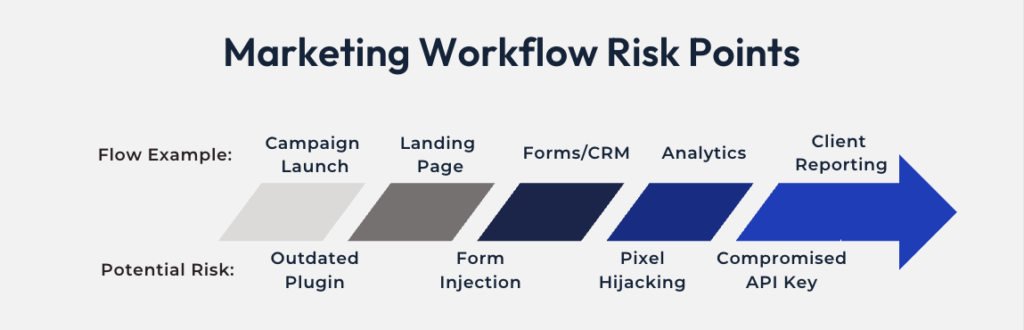
For marketing agencies, cyber security also means protecting the broader marketing stack: CRMs, email platforms, analytics data, and ad accounts connected to client sites. Compromised websites can lead to poisoned tracking, inaccurate attribution, and abuse of marketing pixels or tags, all of which undermine campaign performance.
Backups Are Non-Negotiable
Backups are the most effective preventative measure you can implement. Adopt a multi-layer backup strategy.
Automatic Daily Backups
Every site needs automated daily backups stored off-server. You cannot rely on manual backups when juggling multiple clients, automation enforces consistency. Manual backup processes inevitably fail during busy periods or staff transitions. Automated backups remove human error from the equation and ensure every site receives the same protection regardless of project priority.
On-Demand Backups Before Changes
Before installing a plugin, performing a migration, or rolling out changes, create a restore point. If something breaks, you can revert instantly. This simple habit eliminates the panic that comes from destructive changes. On-demand backups take minutes to create but can save hours of reconstruction work when problems occur.
Clear Retention Policies
Your retention settings should align with each client’s business needs:
High-traffic ecommerce: Longer retention
Small brochure site: Shorter retention acceptable
Campaign microsites: Frequent backups during active periods
Rapid Restore Capabilities
When a site is compromised, you need to restore it quickly and verify integrity before bringing it back online. Speed matters for both security and client confidence. A restore process that takes hours instead of minutes extends downtime and increases client frustration. Your hosting environment should support one-click restores that bring sites back online in minutes, not hours.
Maintain Redundant Copies for Critical Sites
For critical builds, keep a redundant copy outside the hosting environment. This protects you from rare but possible catastrophic failures. Off-site backups provide insurance against scenarios like data center failures, account-level compromises, or hosting provider issues.
Backups protect you from code errors, faulty plugins, and cyberattacks. They also restore client trust instantly. When you can recover from any incident quickly, clients see you as reliable and prepared.
Malware Protection Must Be Continuous
Even the most secure environment can be compromised through weak plugins, infected local machines, or compromised user accounts. Safeguarding your website from malware requires continuous monitoring and multiple layers of defense. Many hacks come from outdated software or vulnerable local devices, not the server itself.
Automated Malware Scanning
Daily or continuous scans detect malicious code, altered files, or injected scripts early. Early detection reduces cleanup time and limits damage. Automated scanning provides consistent monitoring that human review cannot match at scale. When managing dozens of client sites, automated malware detection becomes essential for maintaining security across your entire portfolio. Organizations using extensive security automation report breach costs averaging $2.2 million less than those without automation.
Alerts for Unexpected File Changes
Monitor core files, themes, plugins, and uploads. Even small changes can indicate malware injection. File integrity monitoring provides early warning of compromises that might otherwise go unnoticed for weeks. Attackers often make subtle changes that don’t immediately break functionality, allowing them to operate undetected while stealing data or injecting spam links. Security research shows that millions of cross-site scripting, SQL injection, and path traversal attacks target WordPress sites daily.
Access to Cleanup Tools and Support
You need direct access to cleanup tools or technicians who understand how to isolate malicious code, remove backdoors, and restore safe versions. Generic malware removal guides rarely address the specific circumstances of your infection. Expert support can differentiate between legitimate files and cleverly disguised malware, reducing the risk of incomplete cleanups that leave backdoors active.
Verification After Restoration
Restoring from backup removes damage, but verifying integrity prevents reinfection. Learn how to recover from a website hack with proper verification steps.
Your post-restoration checklist should include:
Checking all user accounts
Updating plugins and themes
Scanning local development machines
Reviewing error logs
Securing passwords and resetting MFA
Client Education and Documentation
Clients often misunderstand malware and assume it indicates hosting failure. Help them understand how security actually works. Education transforms security from a technical mystery into a shared responsibility. When clients understand the relationship between updates, plugins, and security, they’re more likely to approve necessary maintenance and less likely to blame you for incidents beyond your control. WordPress security best practices and preventative security measures provide frameworks for these conversations. Research shows that 827 abandoned plugins were reported in 2023 (nearly six times more than in 2022) highlighting why active maintenance matters.
Help them understand:
How malware commonly enters sites
Why ongoing monitoring is necessary
Why outdated plugins are dangerous
What they can do to reduce risk
Treat malware monitoring as part of your client service offering, not merely a hosting feature. Position security as an ongoing partnership that protects their business interests.
SSL Is the Baseline, Not Optional
Search engines, browsers, and users expect HTTPS everywhere. SSL is no longer a competitive advantage, it’s the floor.
Every Site Needs an SSL Certificate
SSL is required for forms, logins, ecommerce, and SEO. Browsers increasingly block non-HTTPS pages or display security warnings that drive users away immediately. These warnings create immediate trust problems that hurt conversion rates and bounce rates. Google also uses HTTPS as a ranking signal, meaning sites without SSL face both security and SEO disadvantages.
Certificates Must Renew Automatically
Manual renewals create risk. When managing dozens of domains, you need automated SSL with easy visibility into expiration dates. Manual tracking systems fail during busy periods or staff transitions. A single expired certificate can break critical functionality across multiple sites, creating cascading failures that affect numerous clients simultaneously.
Expired SSL Breaks Critical Functionality
When SSL expires:
Forms stop sending
Payment gateways fail
Rankings drop
Conversion funnels silently break
Verify Redirects and Mixed Content
When migrating sites or adjusting domains, verify all SSL-related configurations. Small misconfigurations can create silent failures that damage conversion rates without triggering obvious errors. Mixed content warnings occur when HTTPS pages load HTTP resources, creating security warnings that undermine user trust.
Verify:
301 redirects
Canonical settings
Mixed-content warnings
CDN configurations
Don’t let SSL issues create silent conversion losses. Regular audits of SSL implementation protect both security and revenue.
Establish Clear Deployment and Access Policies
Security problems often come from workflow mistakes rather than infrastructure failures.
Use Version Control Instead of Live Edits
Version control reduces accidental overwrites and provides accountability. Adopt Git-based workflows with clear branching strategies. Version control creates a complete history of every change, making it easy to identify when and how problems were introduced. This audit trail becomes invaluable during security investigations or when troubleshooting mysterious functionality changes.
Store API Keys and Secrets Securely
Never store credentials inside theme files, plugins, or publicly accessible folders. Use secret managers, environment variables, or encrypted vaults. Hardcoded credentials in code repositories create security vulnerabilities that persist for years. Even if you delete a file containing credentials, version control history may retain those secrets indefinitely, making them accessible to anyone who gains repository access.
Revoke Access Immediately When Offboarding
Remove accounts, reset passwords, rotate API keys, and audit permissions the same day a team member or contractor departs. Delayed offboarding creates unnecessary security windows. Former team members rarely act maliciously, but their credentials can be compromised through phishing, data breaches, or device theft long after they leave your organization.
Apply Least-Privilege Principles
The default access level for any agency user or client should be “minimum required to perform their work.” Overly permissive access creates unnecessary risk. Many security incidents occur because users have access to systems and data they don’t actually need for their role.
A weak workflow introduces as much risk as a weak plugin. Securing code and infrastructure means nothing if workflow processes allow unauthorized changes or expose sensitive data unnecessarily.
Protect Your Local Development Environment
Many infections originate on local devices, especially laptops that move between networks or belong to remote contractors.
How Client Sites Get Infected Locally
Infection paths include:
Developer machines running outdated or unpatched software
Files moved between compromised laptops and staging environments
Keyloggers or malware capturing panel credentials
Session cookies stolen from insecure browsers
Mandate Security Standards for Development Machines
Your team should follow these practices:
Regular malware and antivirus scans
Immediate OS-level updates
Current browser versions
Secure WiFi use (avoid public networks for deployments)
Password managers for all credentials
Encrypted hard drives for machines handling client data
Security does not end at the server, it extends to every device that touches client sites.
Educate Clients to Reduce Cyber Security Risk
Clients are part of your security framework. An uninformed client can accidentally undo your protections.
Help Clients Understand Key Security Concepts
Cover these topics in client onboarding:
Why updates matter: Skipping updates increases risk, even if “everything is working fine.”
Why cheap or unverified plugins are dangerous: Free plugins from unknown authors may include vulnerabilities or malicious code.
Why secure forms and payment workflows protect revenue: Security lapses disrupt lead generation and ecommerce.
Why admin access should be limited: More admin users create more opportunities for attackers.
Why backups and monitoring are ongoing needs: Security is not a one-time setup; it’s continuous maintenance.
Position Security as Business Protection
Frame security in terms clients understand: uptime, revenue protection, brand reputation, and customer trust. When clients see security as business protection rather than technical jargon, they’re more likely to support necessary investments. Connect security measures directly to business outcomes they care about: conversion rates, customer data protection, and campaign performance.
Client education reduces emergencies and strengthens your relationship. Well-informed clients become partners in security rather than obstacles to necessary maintenance.
Moving Forward
Security for agencies is about building systems that protect multiple clients simultaneously while maintaining the flexibility to deliver creative, high-performing websites. The principles in this guide form a foundation that scales as your agency grows.
Strong marketing agency cyber security isn’t just risk management, it’s part of how you protect campaign performance, client trust, and long-term growth.Start by auditing your current security posture against these standards. Identify gaps, prioritize improvements, and document your security processes for your team. When security becomes part of your operational culture, it stops being a reactive burden and becomes a competitive advantage.
Explore hosting solutions built for agencies to find infrastructure that supports your security standards and business growth.